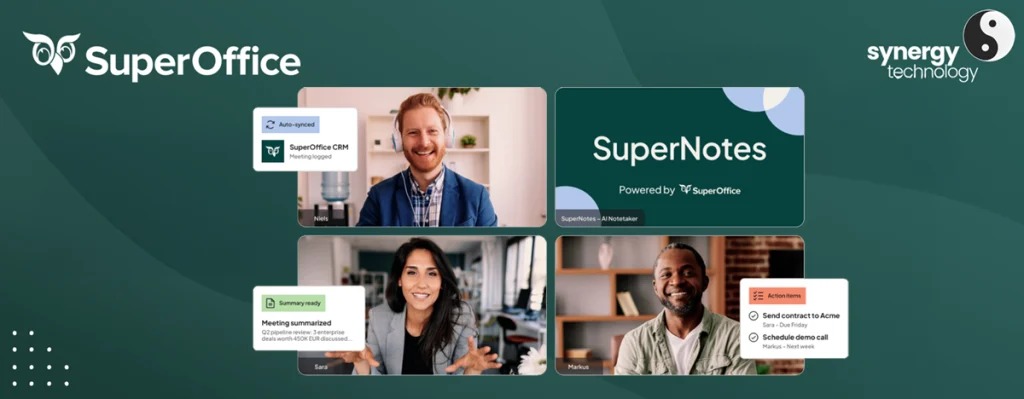
Our partner SuperOffice has released a new add-on, SuperNotes, an AI-powered meeting assistant built specifically for SuperOffice CRM, designed to cut out manual admin before, during and after your customer meetings while improving the quality of data in your CRM.
What is SuperNotes?
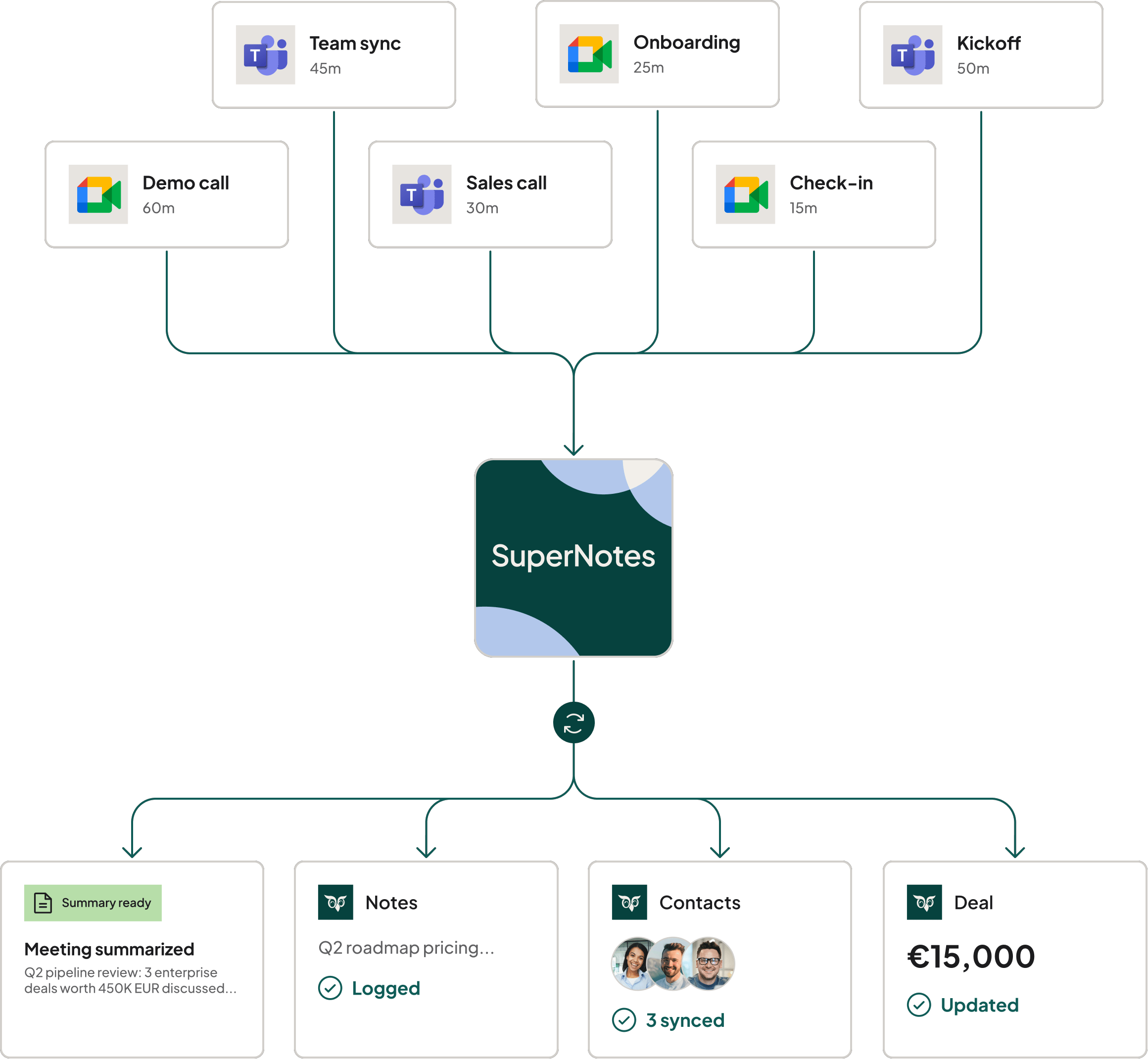
SuperNotes is a SuperOffice product that joins your meetings, captures the conversation, and turns it into structured outcomes directly linked to your CRM. It connects with your calendar, SuperOffice appointments and popular video meeting platforms such as Microsoft Teams and Google Meet, so it fits into your existing setup without forcing users to change how they schedule or run meetings.
Unlike standalone note-taking tools, SuperNotes is built as a CRM‑native assistant: meeting recordings, transcripts, summaries and action points stay tied to the correct company, contact, sale or project in SuperOffice. That means no more scattered documents on shared drives, and no more risk of losing vital context between your conversations and your CRM.
If you want to explore the official overview, you can read more on SuperOffice’s SuperNotes page: SuperNotes | AI meeting notes for SuperOffice CRM
Key features that enhance your SuperOffice CRM
SuperNotes follows a simple end‑to‑end flow: before the meeting, during the meeting, and after the meeting. Each phase is packed with features that directly support teams working in SuperOffice.
Before the Meeting: Smarter Preparation
- Pre‑meeting research gives you a concise briefing on the company and participants, together with relevant CRM history, so you walk into every meeting well prepared.
- Because SuperNotes is connected to SuperOffice, it can surface existing sales, projects, requests or activities linked to your participants, without you needing to dig through multiple screens.
- This context helps sales, account management and project teams prioritise the right talking points and avoid surprises in the meeting.
You can read more about how SuperNotes prepares meetings here: Before meeting | SuperOffice Docs
During the Meeting: Capture Without Distraction
- SuperNotes joins your online meetings, listens in the background and transcribes the conversation, so you can focus on the discussion instead of scrambling to take notes.
- It works with common video platforms such as Microsoft Teams, Google Meet and Zoom, as well as in‑person conversations using recorded audio.
- Key decisions, next steps and commitments are automatically identified in the transcript, so nothing important is missed when you review the meeting.
This is particularly powerful when used together with SuperOffice Teams integrations and meeting workspaces, which are documented here: Teams | SuperOffice Docs and Workspaces | SuperOffice Docs
After the Meeting: From Conversation to Clear Outcomes
- SuperNotes creates a structured summary of the meeting, with highlights, decisions and agreed actions.
- It suggests action points and CRM updates, and even drafts follow‑up emails you can send to the customer.
- Meeting outcomes are presented as CRM‑ready entries, so you can quickly push tasks, updates or notes into SuperOffice with a few clicks instead of rewriting everything manually.
From the SuperOffice appointment, users can access a direct link to the full recording, transcript and summary, allowing them to replay specific moments using time‑stamped highlights. This makes handovers smoother and ensures anyone who was not in the meeting can quickly get up to speed.
You can read more about summaries and post‑meeting output here: Summaries | SuperOffice Docs
Benefits of SuperNotes for Existing SuperOffice Customers
Because SuperNotes has been built by SuperOffice, it is designed to solve the everyday pain points your teams already face in the CRM.
Save time on meeting admin
SuperNotes can save teams many hours each week by automating preparation, transcription, follow‑ups and CRM updates that would otherwise be done manually. This time saving compounds across sales, service, consulting and leadership teams who run multiple meetings every day.
By reducing the time spent on repetitive admin, your users can shift their focus towards revenue‑generating and relationship‑building activities, such as extra customer calls or deeper account reviews.
Improve CRM Data Quality and Adoption
One of the biggest challenges with any CRM is keeping data complete and up‑to‑date. SuperNotes tackles this by turning every meeting into structured, easy‑to‑apply outcomes.
- Suggested CRM entries reduce the friction of updating sales, projects or requests after a meeting.
- Because updates are faster and easier, users are less likely to skip them, leading to more accurate and reliable reporting.
- Role‑based access and CRM‑driven permissions ensure that meeting data is only visible to the right people, in line with how you already control access inside SuperOffice.
Better data quality means more confident forecasting, more targeted follow‑up and a clearer view of customer health across your entire organisation.
Keep Everything in One Secure Place
SuperNotes keeps recordings, transcripts and summaries within the SuperOffice ecosystem, linked to the relevant records in your CRM. This helps you avoid separate note apps, local recordings and “shadow” documents that are hard to secure and easy to lose.
From a compliance perspective, SuperNotes is built with GDPR and EU data handling in mind, with encryption in transit and at rest and additional security validation measures. This gives IT and management confidence that customer conversations are handled responsibly, while still being accessible to the teams that need them.
You can read more about the ethical and security principles behind SuperNotes here: AI CRM Data Ethics | SuperNotes & SuperOffice
Fit for Modern, Distributed Teams
With hybrid and remote work now standard, meeting content often ends up fragmented across different channels and tools. SuperNotes centralises that content back into SuperOffice.
- Team members who could not attend a call can catch up via the recording and summary linked directly from the appointment.
- Sales, marketing, service and leadership can all see the same structured history of conversations without digging through email threads or chat logs.
This shared view supports better collaboration and more consistent customer experiences across your organisation.
How SuperNotes Works With your Existing Tools
SuperNotes is designed to sit alongside the systems your teams already use every day:
- Calendar integration ensures meetings are picked up automatically for recording and preparation when configured, avoiding double‑booking or manual setup.
- Video meeting integrations with Microsoft Teams and Google Meet mean SuperNotes can join calls seamlessly, without users needing to remember extra steps.
- Deep integration with SuperOffice CRM ensures that meeting content is always connected to the right company, contact, sale, project or request.
There is also flexible licensing so you can start with key roles such as sales, recruiters or consultants and scale out as you see the impact.
Configuration options and settings, including privacy controls and workspace management, are covered in the SuperNotes documentation: Settings | SuperOffice Docs and SuperNotes | SuperOffice Docs
Why Now is a Good Time to Explore SuperNotes
If you are already invested in SuperOffice, SuperNotes offers a fast way to amplify that investment by turning every customer conversation into reliable, actionable CRM insight. It helps your teams:
- Reduce low‑value admin
- Strengthen follow‑up quality
- Maintain cleaner, more accurate data
- Collaborate more effectively across departments
Because it is part of the SuperOffice product family, you also benefit from a familiar support model, partner ecosystem and roadmap that aligns with your existing CRM strategy.
To explore the official product information in more detail, you can read more here: SuperNotes | AI meeting notes for SuperOffice CRM and Getting started | SuperOffice Docs
New and Updated Apps in the SuperOffice App Store
Feel free to browse the latest apps on the SuperOffice App Store including out very own Harmoniser.
Looking for more integrations? Visit the SuperOffice App Store.
Arrange a SuperNotes Demo
Seeing SuperNotes in action is the best way to understand how it can reshape your meeting workflows and elevate the value of your SuperOffice data.
If you already use SuperOffice, the next step is simple: contact your usual SuperOffice account manager to arrange a live SuperNotes demonstration tailored to your environment, roles and processes. They can walk you through real‑world examples using your scenarios, discuss licensing and rollout options, and help you plan how to introduce SuperNotes to your teams in a way that delivers quick wins and long‑term value. Call us on 0345 456 0050 or send us a message via our contact page.
Follow us on social media: