
SuperOffice 12.4 is in the process of being released, bringing with it a collection of useful improvements across Requests, Marketing, Forms and SuperOffice for Outlook.
While some of the changes may appear small in isolation, they address familiar day-to-day challenges. They can reduce unnecessary steps, help teams collect more relevant information and make it easier to keep SuperOffice records complete.
Here is a closer look at the new features and what they could mean for your organisation.
Respond to Requests Directly From the Ticket Preview
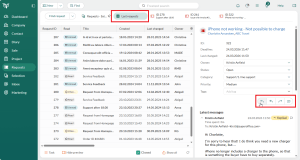
Teams using Requests can now reply from the ticket preview, rather than opening every ticket individually.
This gives users a quicker way to review and respond to customer enquiries. When someone is working through several requests, removing the need to open and close each ticket can make the process feel more straightforward.
The potential benefit is not simply saving a few clicks. It can help users maintain their focus while working through their queue, particularly when dealing with routine questions that do not require a detailed review of the full ticket.
This improvement supports the way service teams already work. Users can view the relevant information, provide a response and move on to the next request with less interruption.
Quicker handling is valuable, but collecting the right information from customers in the first place can be just as important. This is where the new form functionality becomes particularly useful.
Create More Relevant Forms With Conditional Fields
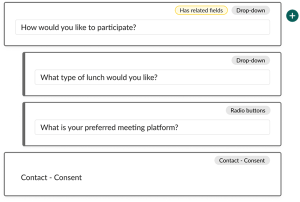
Marketing forms can now include conditional fields. This means the fields shown to someone can change according to the answers they have already provided.
For example, an event registration form might include a checkbox asking whether the person plans to attend. If they select it, an additional field could appear asking about dietary requirements. If they are not attending, that question does not need to be displayed.
This can make forms clearer and easier to complete because people only see questions that are relevant to them. Rather than presenting everyone with a long list of fields, organisations can create a more focused experience that responds to each person’s choices.
Conditional fields can also help teams gather better information. Relevant follow-up questions can appear at the appropriate point, reducing the need for employees to contact someone later to request details that could have been collected through the original form.
Once the structure of a form has been improved, the next consideration is how it looks and whether it feels consistent with the rest of the organisation’s online presence.
Use AI to Help Style Forms
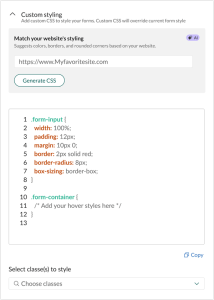
SuperOffice forms now include an option to use AI to assist with their styling. The feature uses a supplied URL, typically the organisation’s website, and attempts to match the form’s appearance to the style of that site.
This gives users a helpful starting point when creating a form. Instead of beginning with an unstyled form and making every design choice manually, they can use an existing website as a visual reference.
A more consistent appearance can help a form feel like a natural part of the customer journey. Whether someone is registering for an event, submitting an enquiry or requesting further information, the transition from the company website to the form should feel familiar.
The feature may also be useful for teams that do not have dedicated design resources available for every campaign. AI-assisted styling does not remove the need to review the result, check accessibility and confirm that it follows brand guidelines, but it can provide a practical foundation. It supports employees with an everyday task while leaving them in control of the result.
The output should still be checked before a form is published, but the feature can make it easier to create a consistent and professional starting point.
The same focus on reducing everyday friction continues in SuperOffice for Outlook.
Work More Effectively With SuperOffice for Outlook
SuperOffice 12.4 introduces several updates for SuperOffice for Outlook. Together, they are intended to make it easier to use SuperOffice while working with email.
Support for shared mailboxes
SuperOffice for Outlook is now supported for shared mailboxes.
Shared mailboxes are often used for team-based communication, such as sales enquiries, customer service or general information requests. Supporting them means that employees working from a shared mailbox can bring SuperOffice into a part of Outlook that may be central to their day-to-day responsibilities.
This can help teams maintain a clearer customer history by making it easier to connect relevant correspondence with SuperOffice. It is particularly useful where several colleagues manage messages through the same mailbox and need shared visibility of customer communication.
This is an important improvement because customer information should not depend on which mailbox an employee happens to be using. Extending support to shared mailboxes brings SuperOffice closer to the way many teams work in Outlook.
Pin the SuperOffice panel while composing an email
Users can now pin the SuperOffice for Outlook panel when writing an email.
Keeping the panel open means the relevant SuperOffice tools remain available while the message is being prepared. Users do not have to reopen the panel if they need to refer to it again before sending.
This is a small usability improvement, but these details can make a noticeable difference when a system is used throughout the working day. Fewer interruptions can help people concentrate on the email they are writing and complete the associated SuperOffice activity at the same time.
Receive reminders to archive emails
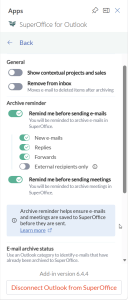
SuperOffice for Outlook can also be configured to remind users to archive emails in SuperOffice.
Archiving customer correspondence helps maintain a useful record of previous communication. However, when employees are busy, it can be easy to send an email and move straight on to the next task.
A reminder provides a timely prompt without preventing the user from sending the message. This can encourage more consistent archiving and help colleagues find the context they need when they next speak to the customer.
Better records can also support continuity across a team. If one employee is unavailable, another can review the archived communication and understand what has already been discussed.
Synergy Technology welcomes this addition because the value of a CRM system depends partly on the quality and completeness of the information held within it. A well-placed reminder can support good working habits without adding a separate administrative process.
Important Information for Outlook Users
Some of the new SuperOffice for Outlook capabilities may need to be approved by your IT team in the Microsoft 365 Admin Center. Organisations planning to use them should involve IT so that the relevant requirements can be reviewed.
The archive reminder is only available in versions of Outlook that support Microsoft Mailbox requirement set 1.12 or later. If the requirement set is not supported, the reminder will not appear, and the email or meeting will be sent as usual.
It is therefore worth checking your Outlook environment before relying on the reminder as part of your archiving process.
Small Changes That Support Better Ways of Working
The SuperOffice 12.4 updates share a common theme: making routine work simpler and more relevant.
Replying from a ticket preview can reduce unnecessary navigation. Conditional fields can help organisations ask better questions. AI-assisted styling can provide a useful starting point for forms. The Outlook improvements can bring SuperOffice closer to the email processes employees already use.
These are practical changes designed to help people spend less time managing systems and more time acting on useful customer information.
As SuperOffice 12.4 is released, availability may depend on your SuperOffice environment, Outlook version and Microsoft 365 configuration. Before enabling the new Outlook functionality, we recommend checking the technical requirements with your IT team.
Customer Stories
- Vygon UK drives improvements in efficiency across departments with SuperOffice CRM
- RAM Universal improves visibility, accountability, and team collaboration with SuperOffice CRM
- Wright Engineering Streamline Processes and Enhance Customer Engagement with the help of SuperOffice CRM
Want more information about SuperOffice?
If you have any further questions or require further information, please contact your SuperOffice account manager Matthew Lamb by telephone: 0345 456 0050 or email: matthew.lamb@synergytechnology.co.uk.
Follow us on social media: