

Pegasus Opera 3 Update: What’s New in Version V3.03.00?
Pegasus has released version V3.03.00 for Pegasus Opera 3 and Opera 3 SQL SE, introducing a range of enhancements across Sales Order Processing, Purchase Order Processing, Stock Processing and reporting. These updates are designed to help users work more efficiently, improve visibility across key processes and simplify everyday tasks. Whether you’re managing customer orders, raising purchase orders or analysing business data, this latest Pegasus Opera 3 update includes several practical improvements that could help streamline your workflow.
In this update, we take a closer look at the new functionality available in V3.03.00, including improvements to repeat invoicing, stock visibility within Purchase Order Processing, minimum purchase order value controls, new stock memo capabilities and additional Excel export options. We’ll also highlight which features are available within Pegasus Opera 3 SQL SE and which are available across both Pegasus Opera variants.
Sales Order Processing improvements
Repeat invoicing enhancements
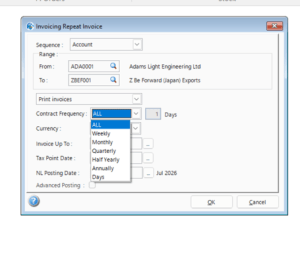
Businesses that manage large volumes of repeat invoices can now gain more control over how invoicing runs are organised. The latest update introduces additional filtering and sequencing options, making it easier to target specific groups of customers and streamline invoice generation.
Users can now filter contacts and sequence repeat invoices by Account, Region, Territory, Type, Route or Despatch, as well as filter by Contract Frequency. This can help reduce manual administration, improve control over invoicing processes and make it easier to manage more complex billing requirements. Available in Pegasus Opera 3 SQL SE.
Posting contract invoices across open nominal periods
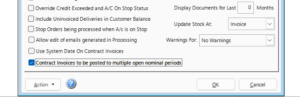
An additional tick option has been introduced within Set Options. This allows users to decide whether contract invoice posting can go across multiple open nominal periods.
This option is only available when Real Time Update of Nominal is selected.
Purchase Order Processing improvements
View stock while raising or editing purchase orders
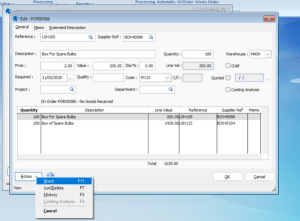
A new stock viewing option has been added to Purchase Order Processing. Previously, users who wanted to check stock while raising a purchase order would need to save the order and close the form before viewing stock information elsewhere.
Businesses can now check stock availability without leaving Purchase Order Processing. Previously, users needed to save and close the purchase order before navigating elsewhere to view stock information.
By making stock information available directly within the purchase order process, users can make purchasing decisions more quickly, reduce interruptions and avoid unnecessary navigation between screens. This can be particularly useful when managing supplier orders in busy purchasing environments.
This is available in both Pegasus Opera 3 SQL SE and Pegasus Opera 3.
Minimum purchase order value settings
Pegasus has introduced the ability to set a minimum purchase order value. Many suppliers now apply minimum order values, making it important for businesses to monitor order totals before placing purchase orders. This update introduces the ability to define minimum purchase order values at both a general and supplier-specific level.
By introducing these controls directly into Pegasus Opera, businesses can reduce the risk of placing orders below supplier requirements, minimise avoidable delivery charges and help purchasing teams follow supplier-specific ordering policies more consistently.
The minimum purchase order value option is available in both Pegasus Opera 3 SQL SE and Pegasus Opera 3.
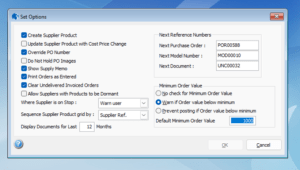
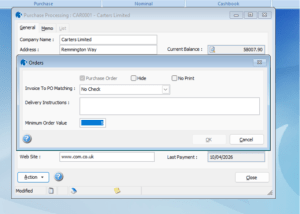
Users can also customise the minimum order value for an individual supplier within Purchase Processing by selecting the Orders option from the Action button and applying the minimum order value.
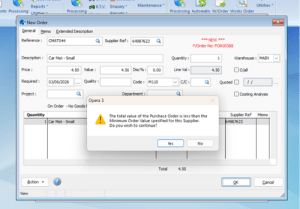
When making a posting, a message will appear depending on the option selected within Set Options. The example below shows the warning displayed when the purchase order value is below the specified minimum order value.
New warning when a supplier is on stop
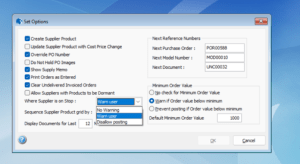
A new warning option has also been added for suppliers that are on stop. Within Set Options, users can choose how the system should respond when a supplier is on stop, including warning the user or disallowing posting.
Managing supplier status is an important part of maintaining purchasing controls. With this update, additional warning options are available when a supplier has been placed on stop.
This helps ensure users are immediately aware of supplier restrictions before processing transactions, reducing the risk of orders being raised against suppliers that should not currently be used.
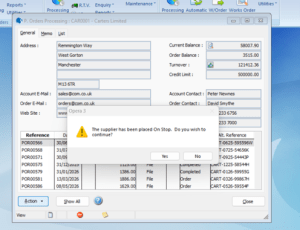
The example below shows the type of warning displayed when a supplier has been placed on stop.
Stock Processing improvements
Sales Memo and Supply Memo tabs
Two new tabs have been added to the Stock Processing screen: Sales Memo and Supply Memo. These are available in both Pegasus Opera 3 SQL SE and Pegasus Opera 3.
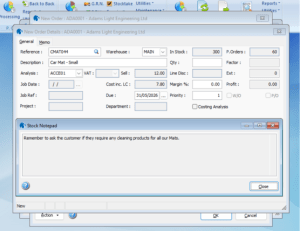
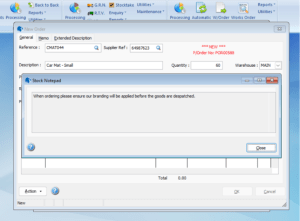
The introduction of Sales Memo and Supply Memo tabs provides greater visibility of important stock-related information. These new tabs allow notes to be associated with stock records and displayed when stock items are selected within Sales Order Processing and Purchase Order Processing.
This can help improve communication between departments, ensure important information remains attached to relevant stock items and reduce the risk of key notes being missed during purchasing or sales processes.
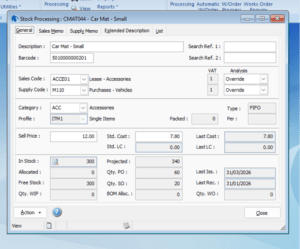
When memo details are created, new icons appear in the status bar to show that memo content exists. These icons help users identify when there is a Sales Memo or Supply Memo associated with a stock reference.
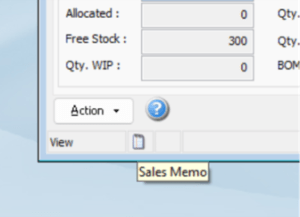
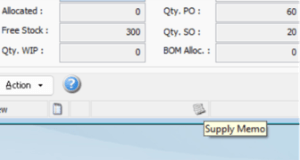
These memos will now be displayed when selecting a stock reference in either Sales Order Processing or Purchase Order Processing.
New Excel export options for reports
Sales Order Processing: Contract Invoicing
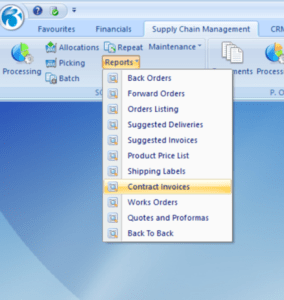
Managing contract invoicing often involves more than simply generating invoices. Many businesses need to review invoicing data, reconcile figures, share information with colleagues or carry out additional analysis outside of Pegasus Opera.
With V3.03.00, Contract Invoicing reports can now be exported directly to Excel in both Pegasus Opera 3 and Pegasus Opera 3 SQL SE.
This enhancement gives users greater flexibility when working with contract invoicing data. Once exported, information can be sorted, filtered and analysed more easily, helping finance and operations teams gain additional insight into invoicing activity.
For businesses managing many recurring contracts, exporting to Excel can also simplify reporting, support internal reviews and make it easier to share invoicing information with stakeholders who may not have direct access to Pegasus Opera.
This is available in both Pegasus Opera 3 SQL SE and Pegasus Opera 3.
Stock: Re-Order Report
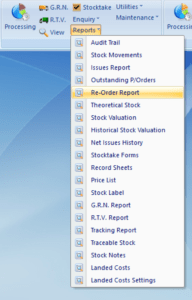
Many businesses rely on stock reports to support purchasing decisions, identify low stock levels and plan replenishment more effectively. In this release, the Re-Order Report can now be exported directly to Excel in both Pegasus Opera 3 and Pegasus Opera 3 SQL SE.
By making the report available in Excel, users have greater flexibility when reviewing and working with stock data. Information can be filtered, sorted and analysed more easily, while reports can also be shared with colleagues or used to support purchasing and stock planning activities.
For businesses managing larger product ranges, this enhancement can make it easier to identify stock requirements, prepare supplier orders and perform additional analysis outside of Pegasus Opera where needed.
Need Support with Pegasus Opera?
The Synergy Technology team is proud to be an official partner of Pegasus Software. If you have any questions about this release or would like support reviewing how these changes apply within your Pegasus Opera system, please contact the Synergy Technology team.
You can call us on 0345 456 0050 or send us an email via our contact page and we will be delighted to assist you.
Follow us on social media: